1. Installation
The DiffSwarm CLI is available via Homebrew for macOS and Linux. The install includes the public diffswarm wrapper, the terminal UI, and the internal diffswarm-rs backend.
# New install
$ brew install bro4all/diffswarm/diffswarm
# Upgrade an existing install
$ brew upgrade diffswarm
# Bun is installed as a dependency for the terminal app runtimeHomebrew 6 note: If an older installation uses Bun from the oven-sh/bun tap and Homebrew reports it as untrusted, run brew trust --formula oven-sh/bun/bun, then retry the DiffSwarm install or upgrade. This trusts only the Bun formula, not the entire tap.
2. Engine Setup (BYOK)
DiffSwarm requires a local AI engine to function. We support Anthropic Claude Code and OpenAI Codex CLI. You must install and authenticate at least one.
The scheduler and artifacts stay local, while bounded review context goes directly through your authenticated CLI to the provider you choose. DiffSwarm servers do not proxy inference or receive your source code, prompts, responses, or findings.
# Anthropic Claude Code (Recommended)
$ npm install -g @anthropic-ai/claude-code
$ claude setup-token
# OpenAI Codex
$ npm install -g @openai/codex
$ codex login
# Current Codex example (or omit --model to use your Codex default)
$ diffswarm pr https://github.com/ORG/REPO/pull/123 --engine codex --model gpt-5.6-sol --reasoning-effort high3. DiffSwarm Login
DiffSwarm is a paid CLI orchestration tool. You need to authenticate your active subscription.
$ diffswarm login
# Follow the prompt. Enter the email used during Stripe checkout.
# A one-time code will be sent to your inbox.
# Clear login plus every local offline-license fallback
$ diffswarm logout --allRight after Stripe checkout, entitlement sync can take a few seconds to a few minutes before diffswarm login succeeds. Use the same email you used at checkout.
How the Review Works
DiffSwarm does not ask one model to critique its own answer. It preserves independent discovery first, opens claims to structured discussion only after every full-PR receipt arrives, and then gives fresh voters the evidence packet. The scheduler enforces the thresholds deterministically.
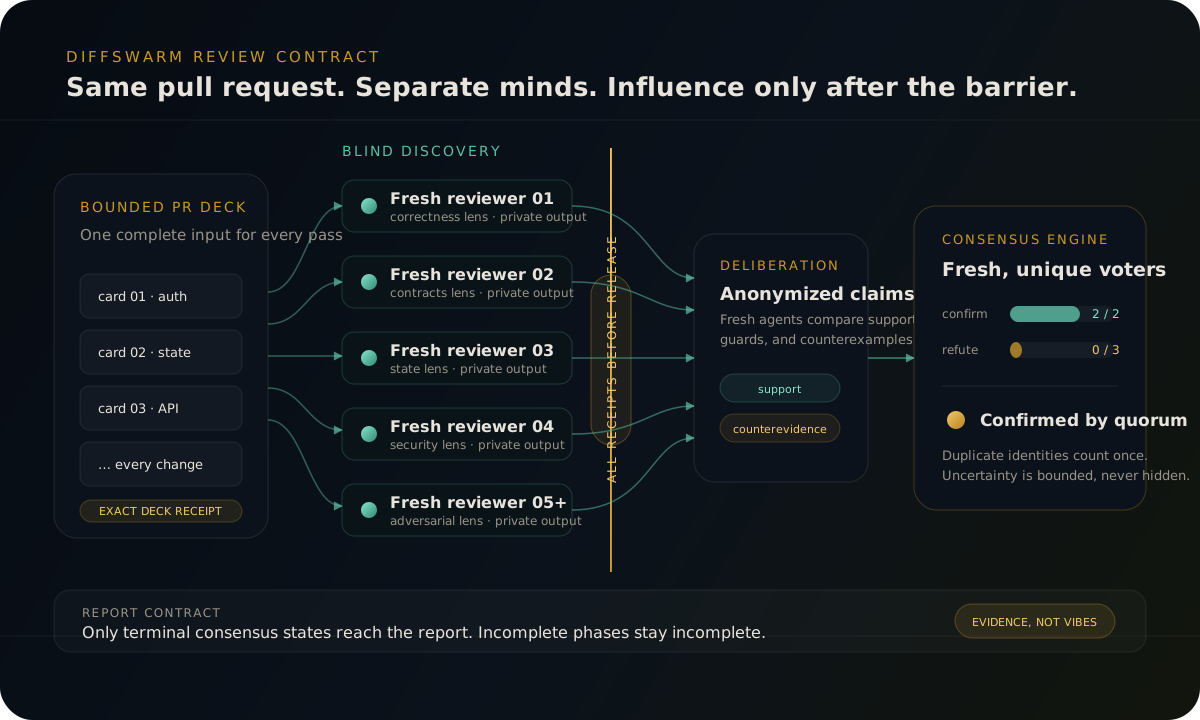
Balanced mode defaults to five blind whole-PR reviews, two deliberation positions per candidate, two confirmations, and three refutations. Security mode raises the confirmation default to three. Duplicate voter identities count once, and a bounded inconclusive panel terminates without pretending it reached quorum.
Running a Bug Hunt
Bug Hunt mode keeps the default view centered on changed files, surfaced issues, and live activity. You follow the repo and inspect exact code or diff evidence when something looks worth fixing.
# Review a remote GitHub PR (Outputs to console & markdown)
$ diffswarm pr https://github.com/ORG/REPO/pull/123 --out report.md
# Review a local diff file
$ diffswarm diff path/to/changes.diff --out report.md
# Post verified findings directly as a PR comment
$ diffswarm pr https://github.com/ORG/REPO/pull/123 --comment
# Dry-run smoke test (No LLM calls, fast check)
$ diffswarm diff tests/fixtures/sample.diff --dry-runSecurity Audit Mode
Security mode applies the same repo-first workflow to auth, input handling, config, and crypto changes so security findings stay readable and actionable.
# Standard security review
$ diffswarm security https://github.com/ORG/REPO/pull/123 --out sec_report.md
# Focus on specific OWASP categories and minimum severity
$ diffswarm security https://github.com/ORG/REPO/pull/123 --owasp-focus "A01,A03" --min-severity highProfiles & Budgets
DiffSwarm auto-tunes review depth and runtime based on PR risk. You can still override that with profiles and explicit budget caps.
Bug Hunt Profiles
| Profile | Review Depth | Duration | Use Case |
|---|---|---|---|
| cheap | Light | ~20 min | Quick sanity check for small PRs |
| balanced | Standard | ~60 min | Default for standard PRs |
| thorough | Deep | ~90 min | Critical logic changes |
Security Profiles
| Profile | Review Depth | Duration | Use Case |
|---|---|---|---|
| quick | Light | ~15 min | Fast secrets & basic scan |
| standard | Standard | ~45 min | Default OWASP review |
| thorough | Deep | ~90 min | Deep attack surface and exploitability analysis |
CLI Reference
# Global Flags
--engine codex|claude # AI engine to use (default: codex)
--model MODEL # Override specific model
--out FILE # Write Markdown report
--json FILE # Write JSON machine-readable findings
--comment # Post findings to PR
--dry-run # Skip actual LLM calls
--print-plan-only # Preview the auto-tuned plan, then exit (no entitlement required)
--tui / --no-tui # Force the terminal console on/off (auto: on in a TTY, off in CI)
# Engine Reasoning
--reasoning-effort LEVEL # codex: none..ultra; claude: low..max (model/version-dependent)
--reasoning-summary auto|concise|detailed|none # Codex reasoning summary verbosity
--max-thinking-tokens N # Fixed budget for compatible older Claude models; adaptive models use effort
# Bug Hunt Tuning
--profile cheap|balanced|thorough
--independent-reviews N # Fresh blind whole-PR passes (minimum: 2)
--deliberations-required N # Fresh discussion positions per candidate (default: 2)
--confirmations-required N # Votes required to confirm (default: 2; security: 3)
--refutations-required N # Votes required to refute (default: 3)
--token-budget N # Planning + reporting target by default (not a hard cap)
--strict-budget # Make --token-budget constrain scheduling (best-effort)
--time-budget-minutes N # Cap wall-time
--allow-expensive-rerun # Required for large/repeated reruns
--fleet-size N # Override parallel review width
# Security Tuning
--security-profile quick|standard|thorough
--owasp-focus CATEGORIES # Comma-separated (e.g. "A01,A03")
--min-severity low|medium|high|criticalRecovery
reconcile-run finalizes a semantically complete saved run — the review work already finished and only the final artifacts need to be written. resume-run truly continues an interrupted run from its saved scheduler checkpoint.
$ diffswarm reconcile-run --run-dir runs/example-run$ diffswarm resume-run --run-dir runs/example-runresume-run continues the saved run configuration as-is. It does not accept engine, model, or budget overrides.
Doctor & Troubleshooting
Run diffswarm doctor to check your local setup. It reports local CLI dependencies (codex, claude, gh), auth session status, the entitlement API URL, and optional offline fallback status.
$ diffswarm doctorAdd --scan-history to scan saved run artifacts and report run-history token usage — useful for tracking BYOK costs. Every run persists report.summary.md, findings.v2.json, and metrics.v2.json (token usage included when available).
$ diffswarm doctor --scan-history